National Park Service
- 4.9
- Rating
- 1.00M
- Installs
- Free
- Price
 Analysis by App-foxy
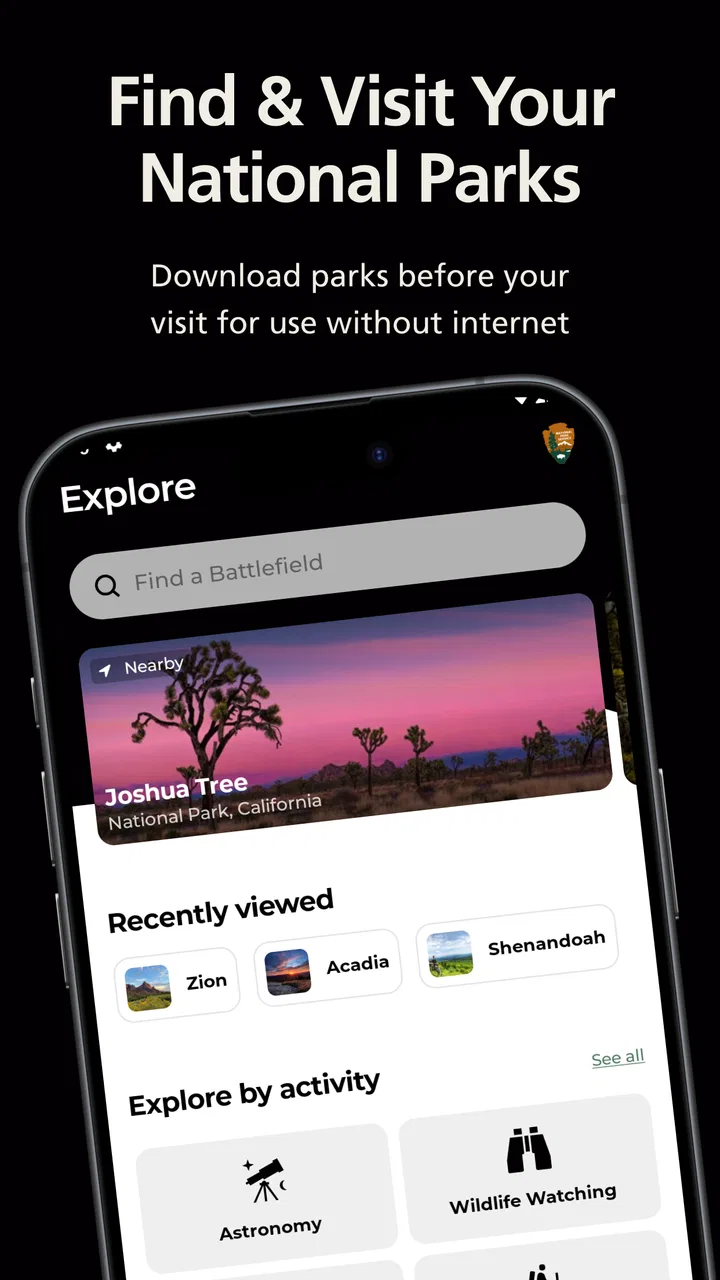
Planning a national park visit usually starts with scattered tasks: finding the right park, checking what is worth seeing, working out how to get there, and saving useful details before the signal disappears. The National Park Service app brings that planning into one official travel and local tool from the National Park Service. I found it most useful as a starting point for choosing a park and organizing a visit, rather than as a complete replacement for every map, weather, or navigation tool I might carry.
The app is free and available to everyone, which makes it easy to recommend for families, occasional visitors, and travelers who do not want to pay for a specialist guide before deciding where to go. Its broad coverage is the main attraction: it is designed for more than 420 parks, so it is not limited to the famous destinations that tend to dominate travel searches. That wider view can change the way you plan a trip, especially when a lesser-known nearby site fits your time better than a major park several hours away.
My overall impression is that the app feels like a practical official reference point. I would open it before a trip, use it to narrow down places, inspect the information for a particular park, and then combine it with tools that are better suited to live driving directions or changing outdoor conditions. That division of labor matters. The app can make the research stage clearer, but responsible park planning still requires attention to current conditions and your own route.
You May Also Like

 Blood Strike: 2.5 Anniversary
Blood Strike’s Loadouts Turn Every Drop Into a Tactical Gamble
A close look at Blood Strike’s custom loadouts: how fast access to signature weapons reshapes its battle royale rhythm, rewards preparation, and narrows the gap between fights.

 Pandora - Music & Podcasts
Pandora’s Music Is Easy to Start, but Harder to Recover
Pandora’s strength is its low-effort path from a seed to a station. Its weak spot is how much confidence it asks you to place in connection, setup, and quiet recovery.

 8 Ball Pool
 Is Built on Rivalries, Rematches, and Routine
A close look at the rivalries, rematches, shared routines, and unanswered safety questions that turn a quick pool match into a persistent mobile community.

 Samsung Music
’s Quiet Strength Is Playing What You Already Own
Its reach comes less from spectacle than from dependable access to a personal library. That simplicity is both the app’s strongest retention engine and its ceiling.

 AccuWeather: Weather Radar
AccuWeather Review: A Quick, Clear Forecast for Everyday Decisions
For everyday plans, the best forecast is the one you can understand quickly. AccuWeather makes rain timing, radar, and local conditions easy to act on, with a few trade-offs.

 Hill Climb Racing
Why Hill Climb Racing Still Turns Crashes Into One More Run
A tiny car, a bumpy hill and one more upgrade: Hill Climb Racing keeps resurfacing because its simple chaos makes every near-miss feel personal.
More From Our News Desk



How the app feels during real trip planning
When I’m planning a park visit, I find it helpful to separate the big decision—where to go—from the day’s smaller logistics. This section looks at how the app can support that first stage, especially when I’m weighing several destinations or coordinating different expectations in a group. It also leads into the practical question of what to prepare before the trip begins.
Quick enough for browsing, with a sensible planning rhythm
For ordinary browsing, I would expect the National Park Service app to be most comfortable when used in short, focused sessions. A traveler can begin with a broad idea, look through parks, and then move toward a specific destination without needing to know every detail beforehand. That is a better experience than searching the web repeatedly for separate official pages, because the app gives the trip a single place to begin.
The perceived speed is less important during a relaxed evening of planning than it is when standing in a parking area or deciding what to do next. In that situation, I would avoid treating it as my only source of immediate guidance. Outdoor travel often involves weak reception, crowded locations, and limited battery, so I prefer to do the research before leaving home and keep essential directions or confirmations available through other means as well.
One useful workflow is to separate discovery from execution. I use the app to compare possible parks and understand which destination matches the kind of day I want. After choosing one, I prepare the practical parts elsewhere: the driving route, fuel stops, weather check, and any personal checklist. This keeps the official park information central without asking one application to handle every part of a trip.
The app’s official origin is especially valuable when I am trying to avoid relying on a random travel blog or an old social media post. Information found through casual searches can be helpful, but it may describe a different season or assume a visitor already knows the area. Starting with the National Park Service app gives me a more appropriate foundation for questions about the park itself.
What happens when usage becomes heavier
The busiest moments are likely to be practical rather than technical: the night before a trip, the morning of arrival, or a holiday when many people are researching the same popular destinations. I would not judge the app only by a calm home Wi-Fi session. A better test is whether it remains useful when I am switching between several parks, revisiting information, and trying to make a decision with limited time.
For a heavy-use planning session, I recommend narrowing the search early. Instead of opening every destination and collecting too much information, I would choose a short list based on distance, available time, and the type of experience I want. Then I would read each park’s details carefully and write down the few items that affect the visit. This reduces repeated loading and, more importantly, prevents planning fatigue.
A second useful habit is to prepare before entering the park. I would not wait until I am at a trailhead to learn the basic shape of the destination. Even if the app opens quickly, outdoor conditions can make phone use inconvenient. A screenshot, note, or separate saved route can serve as a backup for the information I consider essential. This is not a criticism unique to this app; it is simply a sensible way to use any phone-based travel guide outdoors.
The app is also more valuable when a group is making a decision together. One person can use it to compare parks while others discuss distance, the length of the visit, or whether the destination suits children or older relatives. That shared planning role is easy to overlook. It turns the app from a directory into a conversation tool, helping a group move from “we should visit a park” to a realistic choice.
Reliability and the value of an official source
Reliability is where this app earns much of its appeal. It comes from the National Park Service, so I see it as a more trustworthy first stop than an anonymous list of attractions. That does not mean I would blindly assume every detail answers every question I have. A park visit can depend on conditions that change, and I would still check the most time-sensitive matters before setting out.
The large user response is encouraging. The app holds a 4.8 average from around 26 thousand ratings, with more than a million installs. Those figures do not prove that it will suit every traveler, but they suggest that the basic experience has worked well for a substantial audience. I would still pay attention to how it behaves on my own device and in my own travel routine, especially if I expect to use it far from a strong connection.
When an app is tied to an official organization, I value clarity more than flashy presentation. I want to know that I am beginning with the right park and not confusing a similarly named location with a nearby attraction. The official connection helps establish that starting point. It also makes the app feel appropriate for first-time visitors who may not yet know which information sources deserve confidence.
My main reliability caution is about expectations. I would not use the app as the sole authority for immediate road conditions, emergency decisions, or navigation. A park guide and a live navigation service solve different problems. For a long drive, I would keep a route plan and basic offline backup. For a day outdoors, I would also tell someone where I am going and avoid assuming that a phone will remain usable throughout the visit.
Resource demands, older phones, and practical device limits
The app supports devices running Android seven or later, which gives it a relatively broad reach among Android users. That is helpful if a family member uses an older phone or if I prefer to take a spare device on a trip instead of risking my newest one. The current version is 2.5.0, so I would keep the app updated when possible, particularly before a major journey.
Even a well-behaved travel app competes with other demands on a phone. Navigation, photography, messaging, and mobile data can drain a battery much faster than a short planning session at home. My practical advice is to charge before leaving, carry a power bank for longer days, and avoid leaving several demanding apps open when they are not needed. The app itself may not be the largest drain, but it becomes part of the wider outdoor-use problem.
Screen size also affects the experience. On a small phone, reading detailed park information while walking or standing in bright sunlight can feel less comfortable than researching on a tablet or computer beforehand. I would use the phone for quick checks and the larger screen for comparing destinations. This is one reason I prefer preparing a simple personal plan before arrival instead of expecting the app to carry the entire itinerary.
For users with limited storage, the sensible approach is to install the app for the planning period and review what else is occupying the device. I would not fill a phone with unnecessary photos, videos, and unused apps just before a trip. Keeping some free space can make the whole device feel less strained, especially when switching between the park guide, camera, navigation, and communication tools.
Where it beats ordinary alternatives
The usual alternative is a general search engine, which is excellent for finding restaurants, hotels, route options, and recent visitor discussions. Its weakness is that results can be scattered and uneven. The National Park Service app is more focused: I can begin with the parks themselves instead of sorting through commercial pages and unrelated attractions.
Travel blogs and social platforms can add personal ideas, but they often emphasize the most photogenic stops. That can make a destination look simpler or more universally suitable than it really is. I prefer this app for the basic research layer, then use personal accounts only to add perspective. The trade-off is that a general search may offer more variety and local detail, while the official app offers a cleaner connection to the park system.
Dedicated navigation apps remain better for turn-by-turn driving and live route decisions. I would not replace one with this app. Likewise, a weather app is better for the forecast, and a specialized outdoor mapping tool may be preferable for users who need advanced route planning. The National Park Service app works best in the space between a directory and a park-planning guide.
That distinction helps answer an important question: is it useful if I already use Google Maps or another travel app? Yes, if your main need is deciding which national park to visit and understanding the destination from an official park-centered perspective. It is less compelling if you only need a driving route or a list of nearby businesses.
Three planning habits that make it more useful
First, I would use the app for comparison rather than opening it only after choosing a destination. Looking at several possible parks can reveal a better match for the time available. A short weekend does not always justify the most famous option, and a nearby site may provide a more relaxed visit with less complicated logistics.
Second, I would create a “minimum useful plan” from the information I read. I note the destination, the main purpose of the visit, the approximate time I can spend, and the practical questions that could change my decision. This prevents a common mistake: collecting attractive ideas without deciding what is actually possible in one day.
Third, I would use the app as a group filter. If one traveler wants scenic viewpoints, another prefers history, and someone else needs an easy-paced outing, we can compare parks against those needs before committing. That is more effective than choosing based on a single photograph or a vague reputation. It also reduces disappointment for people who have different expectations.
A fourth habit is to treat the app as one layer of preparation, not a substitute for judgment. I would check current travel conditions, prepare for poor reception, and make sure the group knows the plan. The app can improve the quality of the decision, but it cannot remove the responsibility of traveling safely.
Who should use it, and who may want something else
I think the app is a strong fit for first-time national park visitors, families choosing between destinations, road trippers building a broader itinerary, and anyone who wants an official starting point. It is also useful for people who have visited one famous park and now want to discover other parts of the park system without beginning with a completely open-ended web search.
It may be less suitable for someone who expects a complete offline navigation system, detailed specialist route planning, or a single app that handles weather, driving, reservations, and every local service. That user will probably be happier combining this app with dedicated tools. The same is true for a traveler who already knows the exact park and only needs a live route to the entrance.
Accessibility and trip pace are also worth considering. I would not assume that a park’s existence in the app means every activity will suit every visitor. If I am traveling with children, mobility concerns, or a limited amount of time, I would use the app to research possibilities and then make a more careful plan around the group’s actual needs.
My performance verdict after weighing speed and stability
As a travel and local app, the National Park Service app succeeds because it gives park planning a clear home. Its perceived speed matters most during decision-making, and its official identity matters even more when I am trying to avoid outdated or disconnected information. The broad Android compatibility and free price make it easy to try without much commitment.
I would describe its resource demands as manageable for normal planning, while still recommending sensible phone habits for outdoor use. Charge the device, prepare important information before leaving, and keep a second option for navigation or urgent communication. Those steps make the experience more dependable without expecting the app to solve problems it was not designed to solve.
The app has been available since February 1, 2021, and its current version is 2.5.0. Combined with its 4.8 average from roughly 1,500 reviews, that gives me confidence that it is an established option rather than a disposable travel utility. I would still judge it by the specific trip I am planning, but its role is clear and useful.
My recommendation is straightforward: install it if national parks are part of your travel plans, especially when you are still choosing where to go. Use it to discover and organize the park side of the journey, then pair it with navigation, weather checks, and a practical backup plan. The best way to use this app is as your official planning foundation, not as your only outdoor tool. That approach plays to its strengths while avoiding the frustration that comes from asking one app to handle every detail of a demanding trip.
FAQs for National Park Service
01What features does the National Park Service app offer?
The National Park Service app provides users with detailed maps, park information, and real-time updates. You can explore park highlights, plan your visit with interactive itineraries, and access offline maps for areas with no internet. The app also includes educational resources about wildlife and historical landmarks, making it a comprehensive tool for park enthusiasts.
02Is the National Park Service app available for both Android and iOS devices?
Yes, the National Park Service app is available for download on both Android and iOS platforms. You can find it on the Google Play Store for Android devices and the Apple App Store for iOS devices. Ensure your device meets the minimum system requirements for optimal performance.
03Do I need an internet connection to use the National Park Service app?
While some features of the National Park Service app require an internet connection, it also offers offline capabilities. You can download maps and itineraries ahead of time, allowing you to access essential information even in areas with poor or no internet connectivity. This feature is particularly useful for remote park locations.
04Is there a cost associated with using the National Park Service app?
The National Park Service app is free to download and use. However, while the app itself does not charge any fees, some parks may have entrance fees or charges for specific activities. Always check individual park websites or contact them directly for the most accurate fee information.
05Can I use the National Park Service app to make reservations?
Currently, the National Park Service app does not support making reservations directly within the app. However, it provides links and information on how to reserve campsites, tours, and other activities through the respective park’s official reservation system. It’s a convenient starting point for planning your visit.
Pros
- Extensive park information available.
- User-friendly interface for easy navigation.
- Offline maps for no-signal areas.
- Real-time alerts and updates.
- Comprehensive event calendar included.
Cons
- Limited customization options.
- Occasional slow loading times.
- Some features require internet.
- Not all parks have detailed maps.
- In-app search can be finicky.

National Park Service
Gallery